
Work items
User Story
A user story should always belong to whoever requested the work to be completed (usually someone wearing the Product Owner metaphorical ‘hat’) - That said, it is not a requirement for it to be authored by them.
It should include a clear and agreed acceptance criteria, that once achieved completes that story. If it is deemed as too large (it has story points greater than 8 - see Sizing guide), then it should be split into multiple stories and include a feature flag strategy so that it can still be deployed into the Live environment safely knowing that it will not function until the feature flag has been enabled.
Tasks
The developer should create Tasks on the User Story that they feel are necessary to complete that User Story.
Branching strategy
A very successful branching model which was conceived more than 10 years ago and has been used by many software departments, was first published on nvie.com, later it was made available and called Git Flow.
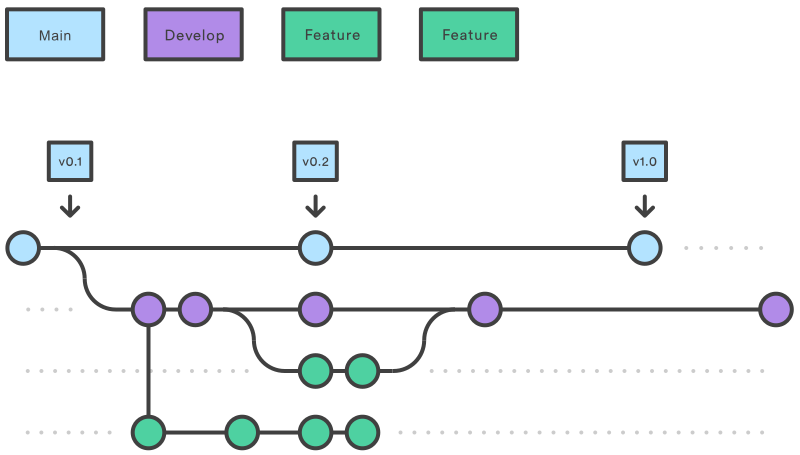
In various companies I have worked, I have implemented this and subsequently integrated it into deployment pipelines. This requires branch names to be formatted in the following way
- feature/{user story number}-title-of-the-user-story
- task/{task number}-title-of-the-task
As per the Git Flow model, feature branches should have the parent branch set to dev and task branches should have the parent branch set to their respective feature branch.
Having the user story / task number in the branch name, makes it easier for someone to cross check stale branches to validate if the branch is no longer required.
Pull request reviews are not required when merging task branches into feature branches. However they are necessary when merging the feature branch into the dev branch.
Once the User story / Feature is deemed complete then it should be merged into the dev branch via the Pull Request procedure.
Additional notes on branching
FEATURE branches
This branch type contains your current work stream. When you have completed your changes, you may execute a Build pipeline step. This will perform a build, once the build completes successfully then you are able to deploy to a test.
DEV branch
This branch only contains completed features aka user stories. This may have features considered ready for production but the timing may not be right eg. CHANGE FREEZE.
MAIN aka MASTER branch
This branch only contains features deemed to be complete and is as close to what is running in the PRODUCTION environment as possible. Also note, this may contain features that are in the process of being sent to a PRODUCTION environment however the window for this is very narrow (10 minutes) and so can be considered as to what is running in the production environment.