
SSL Certificates
Why?
An SSL certificate encrypts content sent from Server to Client and Client to server. It prevents Man in the middle attacks and instils confidence in the user as a lock icon will appear in the address bar of the browser.

The renewal process - Start early
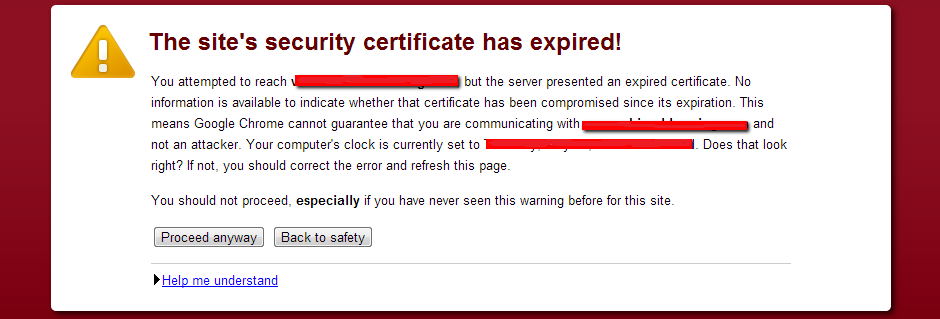
CAUTION : There are multiple steps to perform before actually receiving the SSL certificate so start early (ideally two weeks before expiry), if you are complete within this time then great, if you are late then customers will not be able to access the website until a certificate is applied, example below.
A wildcard certificate (*.domain.com) is one that can be used on many subdomains and therefore protects any subdomain we choose.
- www.domain.com
- test.domain.com
Step 1 - Purchase certificate
When going through the steps, you will be advise you to download a key file STAR.domain.com_key.txt, you will need this when applying the certificate. You must keep this file in a secure safe place as it is the private key file which unlocks the certificate issued later, you will not be able to download this again.
Step 2 - Business Validation
One important requirement of an Domain EV certificate is the business validation process. This requires the certificate company to verify the company actually exists and is registered and you are the company.
During the validation process, an email is sent to the registered business who arranges a time and date when they should receive a phone call to preform the validation. The phone number must be registered to the company and therefore you cannot give your mobile to try and short circuit this process.
Once validation is complete, the issuer will issue the certificate.
Step 3 - Download and modify the files
In the download bundle file STAR.domain.com_cert.zip there will be three files
STAR.domain.com.ca-bundle- The linkSTAR.domain.com.crt- The actual certificateSTAR.domain.com.p7b- You won’t need this
Open STAR.domain.com.crt in an text editor and copy and paste the contents of STAR.domain.com.ca-bundle to the end of STAR.domain.com.crt
When an operating system is deployed is comes with various trusted root certificates. Every certificate issued must trace back to one of these root certificates (Certification Path) for it to be considered as valid. The
ca-bundlefile performs this vital process.
Step 4 - Installing the files
At this point you should have the following files
STAR.domain.com.crt- This is both filesSTAR.domain.com.crt+STAR.domain.com.ca-bundleconcatenated.STAR.domain.com_key.txt- Retrieved from that safe place you put it before the business validation process began.
Upload these to your cloud provider.